Run Tests
To run a test in TestEngine, you need to send a request to TestEngine with a ReadyAPI project attached. This topic shows how to do it.
1. Prepare a ReadyAPI project
The request to TestEngine must contain a ReadyAPI project. Start by identifying what type of project you have. This determines how you send it to TestEngine.
Single .xml file project
Use this option if your ReadyAPI project is a single .xml file and does not use external data sources, certificates, attachments, or composite folder structures.
How to find the project file
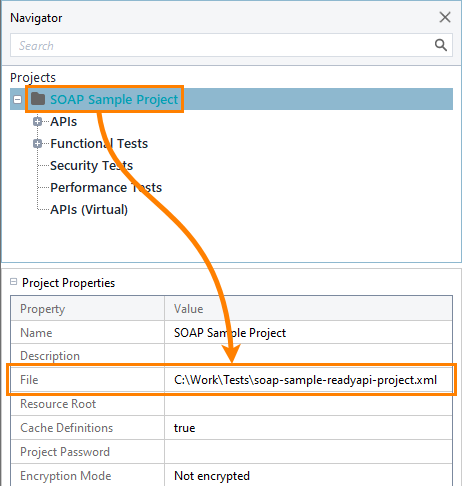
You can find the path to the project file in the File project property:
Tip
If the property is empty, your project is not saved. Right-click the project in the Navigator and select Save or Save As.
Project with external files or a composite project
Use this option if your project:
Uses external data sources, certificates, attachments, or
Is structured as a composite project.
In these cases, you must package the project and all required files into a ZIP archive before sending it to TestEngine.
Packaging using CI/CD (source-controlled projects)
Use this method if your composite project lives in source control, such as Git. The scripts in the following examples pull the project from your SCM provider (GitHub, Jenkins, or Azure), zip it, and upload it to TestEngine with curl. TestEngine accepts only ZIP files, and these scripts eliminate the need for manual packaging of the composite project.
Examples
pipeline {
    agent any
    environment {
        GITHUB_TOKEN = credentials('github-token')  // Jenkins credentials ID (type: Secret Text)
        GIT_REPO = "https://github.com/example-user/private-repo.git"
        GIT_BRANCH = "main"
        ZIP_FILE = "composite.zip"
        API_URL = "http://testengine.internal/api/v1/testjobs"
    }
    stages {
        stage('Checkout') {
            steps {
                // Auth to GitHub via token (HTTPS)
                git credentialsId: 'github-token', branch: "${env.GIT_BRANCH}", url: "https://${GITHUB_TOKEN}@github.com/example-user/private-repo.git"
            }
        }
        stage('Zip folder') {
            steps {
                sh "zip -r ${env.ZIP_FILE} composite"
            }
        }
        stage('Send to TestEngine') {
            steps {
                withCredentials([usernamePassword(credentialsId: 'testengine-creds', usernameVariable: 'API_USER', passwordVariable: 'API_PASS')]) {
                    sh """
                        curl -u "$API_USER:$API_PASS" \\
                             --data-binary "@${env.ZIP_FILE}" \\
                             -H "Content-Type: application/zip" \\
                             -X POST "${env.API_URL}"
                    """
                }
            }
        }
    }
}name: Send to TestEngine
on:
push:
branches: [main]
jobs:
build-and-send:
runs-on: ubuntu-latest
env:
ZIP_FILE: composite.zip
TESTENGINE_URL: http://testengine.internal/api/v1/testjobs
steps:
- name: Checkout private repo
uses: actions/checkout@v4
with:
token: ${{ secrets.GITHUB_TOKEN }} # or custom PAT if needed
- name: Zip folder
run: zip -r $ZIP_FILE composite
- name: Send to TestEngine
env:
TESTENGINE_USER: ${{ secrets.TESTENGINE_USER }}
TESTENGINE_PASS: ${{ secrets.TESTENGINE_PASS }}
run: |
curl -u "$TESTENGINE_USER:$TESTENGINE_PASS" \
--data-binary "@$ZIP_FILE" \
-H "Content-Type: application/zip" \
-X POST "$TESTENGINE_URL"Important
This pipeline runs only when you manually trigger it. You must specify the folder to zip by setting the folderName parameter. In this example, the ZIP file is saved to $(Build.ArtifactStagingDirectory), the pipeline’s temporary artifact staging directory for the current run. You can change the archiveFile path if you want to store the ZIP elsewhere, and you can adjust the triggers if you want the pipeline to run automatically.
trigger: none

parameters:
  - name: folderName
    type: string
    displayName: 'Folder to zip'

pool:
  vmImage: ubuntu-latest

variables:
  TESTENGINE_URL: 'http://testengine.internal/api/v1/testjobs'

steps:
  - checkout: self

  - task: ArchiveFiles@2
    displayName: Zip composite folder (ArchiveFiles@2)
    inputs:
      rootFolderOrFile: '$(Build.SourcesDirectory)/${{ parameters.folderName }}'
      includeRootFolder: false
      archiveType: 'zip'
      archiveFile: '$(Build.ArtifactStagingDirectory)/${{ parameters.folderName }}.zip'
      replaceExistingArchive: true

  - script: |
      set -euo pipefail
      curl -sS --fail \
        -u "$(TESTENGINE_USER):$(TESTENGINE_PASS)" \
        -H "Content-Type: application/zip" \
        --data-binary "@$(Build.ArtifactStagingDirectory)/${{ parameters.folderName }}.zip" \
        -X POST "$(TESTENGINE_URL)"
    displayName: Send to TestEngine
    env:
      TESTENGINE_USER: $(TESTENGINE_USER)
      TESTENGINE_PASS: $(TESTENGINE_PASS)
Packaging manually in ReadyAPI
Use this method if you work locally in ReadyAPI.
In ReadyAPI, in the Navigator, right-click the project and select Export from the context menu.
Select a folder where you want to save the package.
Important
ReadyAPI may not detect all external dependencies when gathering files (for example, files used inside scripts). After exporting:
Open the ZIP package and check that all required files are included.
Add any missing files manually.
Update file paths in the project as needed.
Use relative paths where possible.
2. Send a request
To send a project to TestEngine and run a test, use the following operation:
POST http://<testengine-host>:8080/api/v1/testjobs[?parameters]
Override custom properties
When you run a test from TestEngine, you can override custom property values for the test run. To do this, you need to send a JSON file containing the needed values and send it to TestEngine along with the project file.
1. Create JSON file
The file must contain a JSON array. Each element of the array specifies a project item and its custom properties to override. For example:
Each array element consists of the following elements:
Element | Description |
|---|---|
| [Optional] The name of a test suite or a test case containing the needed custom properties. Skip this element to specify project-level properties. |
| An object containg custom properties to override. Each custom property is a |
2. Send properties file
Send a request of the multipart/form-data content-type, and attach both project file and a property file with the following content-ID values:
File | Content-ID |
|---|---|
Project file |
|
Properties file |
|
Create a project and add an API to it, by using the TestEngine API definition. See Adding More APIs to Existing Projects to learn how to do it.
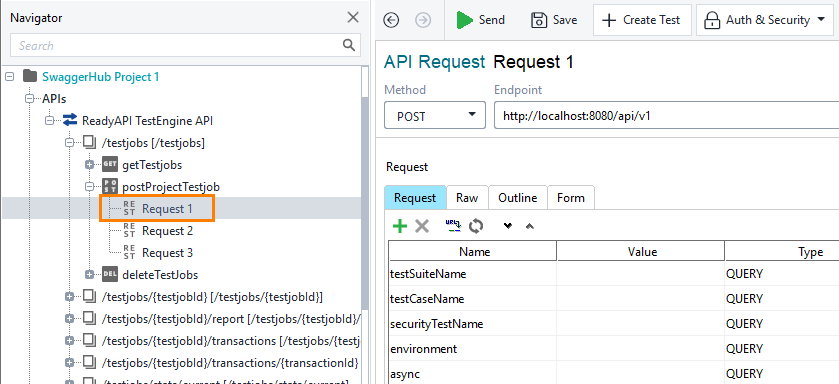
Open Projects and select the POST request to the /testjobs resource:
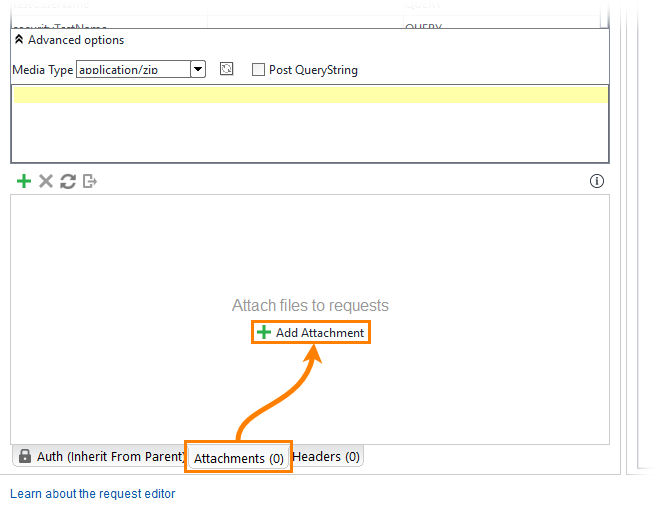
Open the Attachment panel and click Add Attachment:
Specify the project you want to send to TestEngine. Set the Content type of the attachment to application/xml, and the ContentID to
project: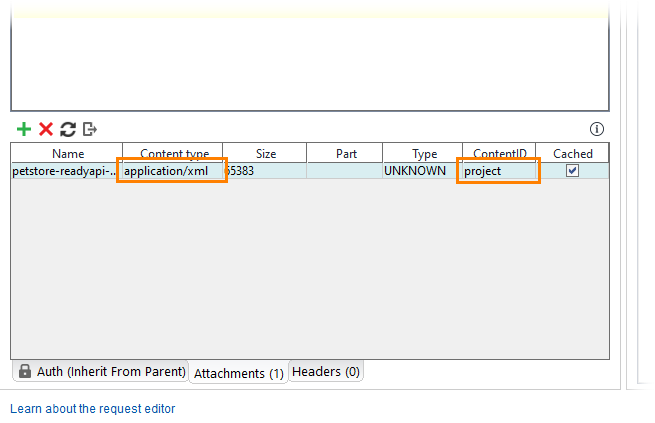
Click Add Attachment and specify the JSON file you want to send to TestEngine. Set its ContentID to
properties: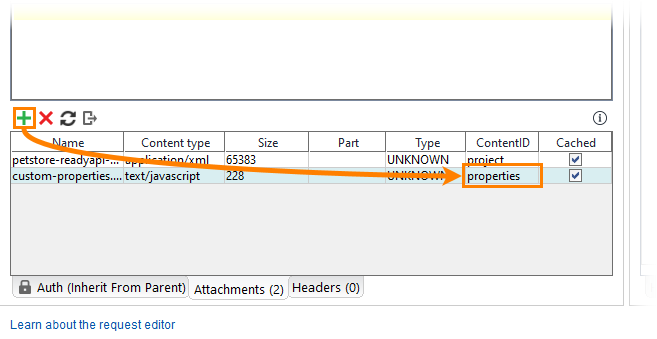
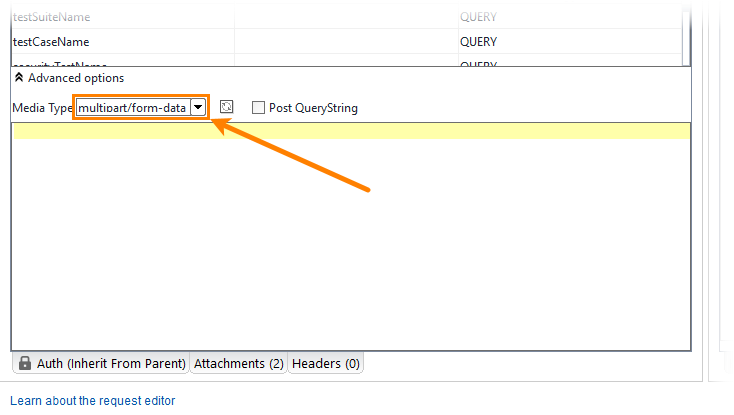
Set the Media type of the request’s payload to multipart/form-data:
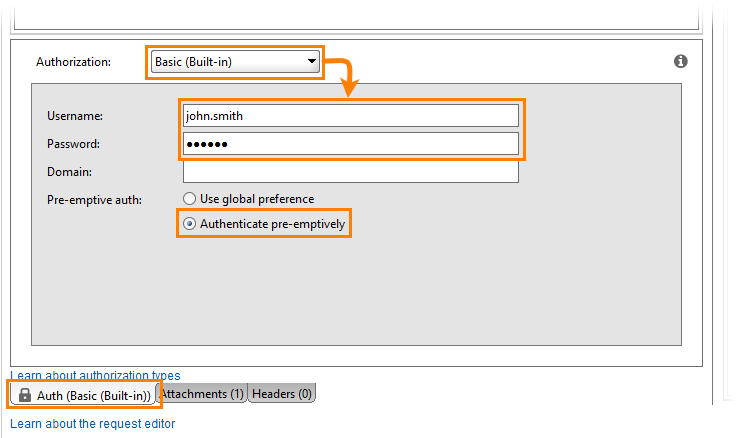
Open the Auth panel.
Select the Basic (Built-in) authorization type.
Tip
If you use the same credentials in several requests, use authorization profiles.
Specify user credentials and select the Authenticate pre-emptively option:
Send the request:

Examples
Create a project by using the TestEngine API definition. See Creating Project From OpenAPI/Swagger Definition to learn how to do it.
Tip
You can also create the needed request from scratch.
Open Projects and select the POST request to the /testjobs resource:
Open the Attachment panel and click Add Attachment.
Specify the project you want to send to TestEngine.
Set the Content type of the attachment and Media Type of the payload to application/xml.
Open the Auth panel.
Select the Basic (Built-in) authorization type.
Tip
If you use the same credentials in several requests, use authorization profiles.
Specify user credentials and select the Authenticate pre-emptively option:
Send the request:
In TestEngine, you can give a job a high priority. TestEngine will run high-priority jobs before regular jobs.
Create a project by using the TestEngine API definition. See Creating Project From OpenAPI/Swagger Definition to learn how to do it.
Tip
You can also create the needed request from scratch.
Open Projects and select the POST request to the /testjobs resource:
Open the Attachment panel and click Add Attachment.
Specify the project you want to send to TestEngine.
Set the Content type of the attachment and Media Type of the payload to application/xml.
Open the Auth panel.
Select the Basic (Built-in) authorization type.
Tip
If you use the same credentials in several requests, use authorization profiles.
Specify the user credentials and select the Authenticate pre-emptively option:
Set the
priorityJobparameter totrue: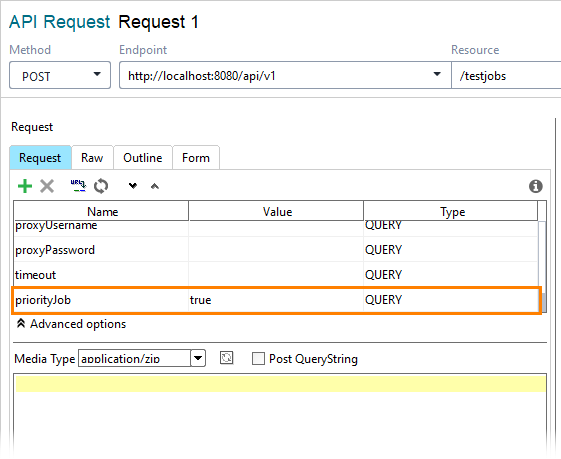
Send the request:
Create a project by using the TestEngine API definition. See Creating Project From OpenAPI/Swagger Definition to learn how to do it.
Tip
You can also create the needed request from scratch.
Open Projects and select the POST request to the /testjobs resource:
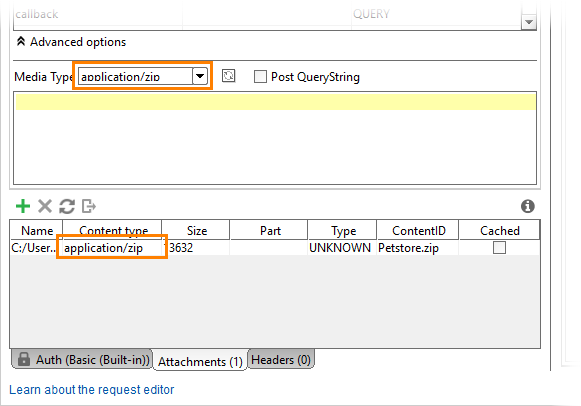
Specify a zip package that contains a project you want to send to TestEngine (an xml file or a folder with a composite project) and all the required files.
Set the Content type of the attachment and Media Type of the payload to application/zip.
Open the Auth panel.
Select the Basic (Built-in) authorization type.
Tip
If you use the same credentials in several requests, use authorization profiles.
Specify user credentials and select the Authenticate pre-emptively option:
Send the request:
Create a project by using the TestEngine API definition. See Creating Project From OpenAPI/Swagger Definition to learn how to do it.
Tip
You can also create the needed request from scratch.
Open Projects and select the POST request to the /testjobs resource:
Open the Attachment panel and click Add Attachment.
Specify the project you want to send to TestEngine.
Set the Content type of the attachment and Media Type of the payload to application/xml.
Open the Auth panel.
Select the Basic (Built-in) authorization type.
Tip
If you use the same credentials in several requests, use authorization profiles.
Specify the user credentials and select the Authenticate pre-emptively option:
Specify the name of the test case you want to run in the
testCaseNameparameter: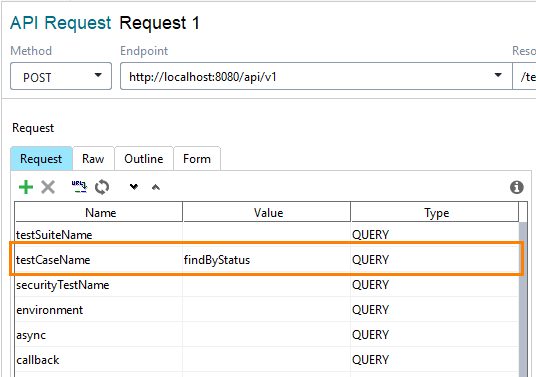
Send the request:
Create a project by using the TestEngine API definition. See Creating Project From OpenAPI/Swagger Definition to learn how to do it.
Tip
You can also create the needed request from scratch.
Open Projects and select the POST request to the /testjobs resource:
Open the Attachment panel and click Add Attachment.
Specify the project you want to send to TestEngine.
Set the Content type of the attachment and Media Type of the payload to application/xml.
Open the Auth panel.
Select the Basic (Built-in) authorization type.
Tip
If you use the same credentials in several requests, use authorization profiles.
Specify the user credentials and select the Authenticate pre-emptively option:
Specify the name of the security test you want to run in the
testCaseNameparameter:Send the request:
Parameters
The POST request to the /testjobs resource has a number of parameters that allow you to run a particular test case, test suite, run security tests, run tests with the needed tag, or use a specific environment, and so on.
See the full list of operation parameters in the TestEngine specification on Swagger Studio:
 https://app.swaggerhub.com/apis/smartbear/readyapi-testengine/